The purpose of this document is to describe the basic flow of controlling a MG Battery system using external commands sent via NMEA 2000.
More detailed monitoring and control is possible but not required, see the respective communication guides for a full list of available information for devices.
This document only applies if the
MG NMEA2000CAN-bus protocol is used.
¶ Finding device on NMEA bus
Please see the Tracking MG device on NMEA2000 CAN-bus for information about discovering and tracking a MG device on the NMEA bus.
¶ Supported devices
This document describes commands and protocols that are supported by the following MG devices:
- SmartLink PLC
- SmartLink MX
- Master HV
- Master LV
- Master LV 12V (from hardware version 0.5 onwards)
¶ Communication guides
This document will refer to VREGS and MGREGS, these are identifiers assigned to parameters and commands.
The available data for each device can be found in the respective Communication Guide:
These documents indicate if a register and therefore variable is sent periodically and or on change. It also contains explanations on how to request a variable using the registers.
¶ Register usage selection
When managing a combined system the simplest way to monitor the system is by only monitoring the registers as sent by the combining device, for example the SmartLink MX or SmartLink PLC. The combining device intelligently combines raw data from the individual devices.
It takes the number of available devices into account and will adust parameters as required based on this.
The rules for combining registers and individual flags is defined in the communication guide of the SmartLink MX.
Some variables are available from multiple sources, base NMEA PGNs, VREGs and MGREGs.
One example of this is the NMEA Battery Voltage DC 0x1F214 PGN, this contains the system voltage with a resolution of 0.01 V and can hold a value from -327.68 up to +327.66 volt. The same value is also available in VREG Voltage 0xED8D with the same resolution and limit.
This voltage limit could be a limitation for high voltage systems.
The MGREG register System voltage 0x48EE has a resolution of 0.001 V and has a range from -2147483.648 to +2147483.647 volt.
¶ Controlling and monitoring operational state
The (combined) operational state of a MG system can be controlled using the NMEA CAN-bus.
This includes starting, stopping and resetting BMS devices or an entire combined BMS system.
The availability of commands and operations depends on the specific hardware model and configuration, this document will describe the recommended configurations.
¶ Device settings
MG BMSs have a setting that enables the control via NMEA 2000, the name and functionality of this varies based on hardware type.
A device must be restarted after changing a setting.
¶ MG Master HV
The Master HV has a setting called Combined BMSs, enabling this setting configures the Master to work in a combined system of multiple Masters under a MG SmartLink MX or similar device.
With this setting disabled External control is still possible but Combining is not. Note that the availability of responses of the Master HV change based on the setting.
When directly controling one BMS Combined BMSs should be disabled.
¶ Other Master types
The other supported MG Master types (Master LV, Master LV 12V) have a setting called: External control.
This enables both External control and Combining. Thereby enabling the controlling of the device via the NMEA 2000 CAN-bus.
The processes described in this document require the setting to be enabled.
¶ Control operational state
The commands and responses used for controlling the combined state are sent using a Vreg Combined control state 0x0378.
Messages are global, the network address (NAD) of the addressed device is included in the payload of the message.
All messages are padded to 8 bytes using "0x00".
Commands rely on hierarchy, in MX type device based systems the system integrator should only send commands to the MX type device. This will then send any required commands to the BMSs, including the heartbeat.
System integrator > MX type device > BMSs
¶ Control message IDs
| Code | Description |
|---|---|
| SI | System Integrator or user |
| MX | SmartLink MX, SmartLink PLC and similar MG devices |
| HV | MG Master HV |
| LV | MG Master LV, Master LV 12V and SmartLink Connect |
| Code (HEX) | Name | Type | Sent by | Can be sent to |
|---|---|---|---|---|
| 0x00 | Waiting for user | State | HV, LV | - |
| 0x01 | Pre-charging | State | HV, LV | - |
| 0x02 | Operating | State | HV, LV | - |
| 0x10 | Received switch start | Response | MX, HV, LV | - |
| 0x11 | Received can-bus start | Response | MX, HV, LV | - |
| 0x12 | Start not allowed | Response | MX | - |
| 0x20 | Heartbeat | Heartbeat | SI1, MX | HV |
| 0x21 | Start | Command | SI, MX | MX, HV, LV |
| 0x22 | Stop | Command | SI, MX | MX, HV, LV |
| 0x23 | Restart | Command | SI | MX |
- In MX type systems the MX type device sends heartbeat commands
The transmission of states like the
OPERATINGstate depends on the MG BMS used and its configuration.
It is therefore highly recommended to not rely on these states, instead always use theBMS state0x0371Vreg to monitor the active BMS state.
See Monitoring status section for more details.
¶ Example control messages
Devices used in examples:
System integrator(NAD: 0x20)
Device MG(NAD: 0x50) = MG SmartLink MX or SmartLink PLC or MG BMS or other MG device
Global(NAD: 0xFF)
Example command:
- Register:
Combined control state(0x0378) - Command:
Start command(0x21)
| CAN-ID | Data |
|---|---|
| 0x1CEFFF20 | 0x66 0x99 0x78 0x03 0x21 0x50 0x00 0x00 |
Example response / state:
- Register:
Combined control state(0x0378) - Response:
Received can-bus start(0x11)
| CAN-ID | Data | Device |
|---|---|---|
| 0x1CEFFF50 | 0x66 0x99 0x78 0x03 0x11 0x20 0x00 0x00 | MX type |
| 0x1CEFFF50 | 0x66 0x99 0x78 0x03 0x11 0x00 0x00 0x00 | BMS |
¶ Monitoring status
The state of the system can be monitored using the BMS state as found in Vreg: BMS state 0x0371
This value is sent on change but can also be requested.
The SmartLink MX, SmartLink PLC and similar MG devices combine data of the individual BMSs, it is therefore not required to monitor individual devices as long as the combining device is monitored.
¶ Status message IDs
| Code (Dec) | Code (Hex) | Name |
|---|---|---|
| 0-8 | 0x00 - 0x08 | Initialising |
| 9 | 0x09 | Running |
| 10 | 0x0A | Error |
| 12 | 0x0C | Shutting down |
| 13 | 0x0D | Updating battery firmware |
| 14 | 0x0E | Standby |
| 15 | 0x0F | Going to running state |
| 16 | 0x10 | Pre-charging |
State 9 Running indicates that the system has started up and is running, only in this state is the system fully operational.
¶ Example status messages
Devices used in examples:
System integrator(NAD: 0x20)
Device MG(NAD: 0x50) = MG SmartLink MX or SmartLink PLC or MG BMS or other MG device
Global(NAD: 0xFF)
Example request:
- Register:
BMS state(0x0371) - Command:
Request(0x0001)
| CAN-ID | Data |
|---|---|
| 0x1CEF5020 | 0x66 0x99 0x01 0x00 0x71 0x03 0x00 0x00 |
Example on change / response message:
- Register:
BMS state(0x0371) - Status:
Running(0x09)
| CAN-ID | Data |
|---|---|
| 0x1CEFFF50 | 0x66 0x99 0x71 0x03 0x09 0x00 0x00 0x00 |
¶ Reset request
It might be required to reset a battery system, one example is to reset from a fail-safe event.
The VREG used for this is Restart request 0x0379.
In systems using a SmartLink MX, SmartLink PLC or similar MG devices the distribution of sending this command is handled by the MX type device, instead a Combined control state message needs to be sent with the 0x23 Restart command and the node address as payload. See Control operational state for example message.
¶ Example reset mesasge
Devices used in examples:
System integrator(NAD: 0x20)
Device MG(NAD: 0x50) = MG SmartLink MX or SmartLink PLC or MG BMS or other MG device
Direct request example command:
- Register:
Restart request(0x0379)
| CAN-ID | Data |
|---|---|
| 0x1CEF5020 | 0x66 0x99 0x79 0x03 0x00 0x00 0x00 0x00 |
Example response / state:
- Register:
Restart request(0x0379) - Response:
Acknowledge(0x0002):OK(0x0000)
| CAN-ID | Data |
|---|---|
| 0x1CEF2050 | 0x66 0x99 0x02 0x00 0x79 0x03 0x00 0x00 |
¶ Message flows
The most common control situations have been described below.
Where there is a difference between different hardware and or configuration multiple tab pages are provided.
¶ Combined systems Flows
Systems using SmartLink MX, SmartLink PLC or similar devices should be used to combine multiple BMSs in to one combined battery system.
Sending of the Heartbeat command is handled by the MX type device.
When using multiple BMS devices only one is commanded to start, other devices will monitor the bus voltage and join once the bus voltage is with in a save window of their battery voltage.
The choice of the initial device can be configured using the SmartLink MX / PLC settings.
See SmartLink MX user guide: Control mode for selection options.
Starting a system can be done via NMEA 2000, however in systems using Master LV, 12V or SmartLink Connect the BMSs need to be turned on manually using a physical button / input. These devices will then enter a state where they can be started using the NMEA 2000 (BMS state: Standby). Devices shut down or restarted using NMEA 2000 will return to this state automatically.
The BMS state of the Combining device will change to Running as soon as at least one BMS has set its state to Running.
The other BMSs (if applicable) will join the system as soon as their system voltage in within a set margin of the combined system voltage.
Start procedure:
- Send
Combined control state:Start commandcommand - Wait for
BMS state:RunningorErrorstate
The respective Communication guide describes the available error registers.
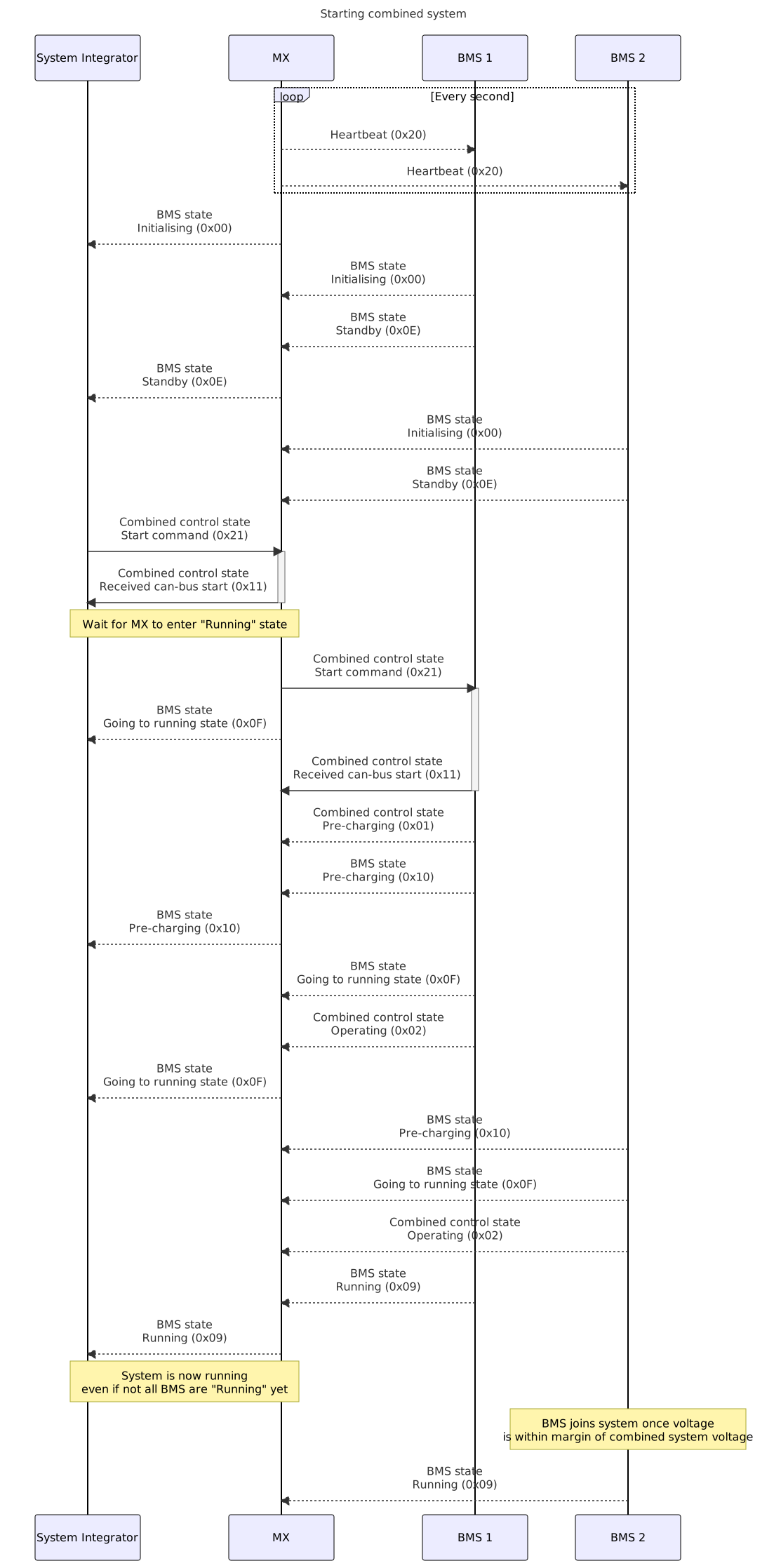
The system integrator should monitor the SmartLink MX, SmartLink PLC or similar device, as this device will intelligently combine all variables from the BMSs.
While the system is running the BMS state will remain Running. On change or on request this variable can be retrieved.
Additional variables as described in the Communication guides are available to more precisely monitor the live status of the combined system, but this is not required.
Connected charges can be controlled as described in Controlling chargers using NMEA 2000.
To ensure a graceful shut down chargers and loads should be shutdown or limited before stopping the BMS.
Shutdown procedure:
- Send
Combined control state:Stopcommand - Wait for
BMS state:Standbystate
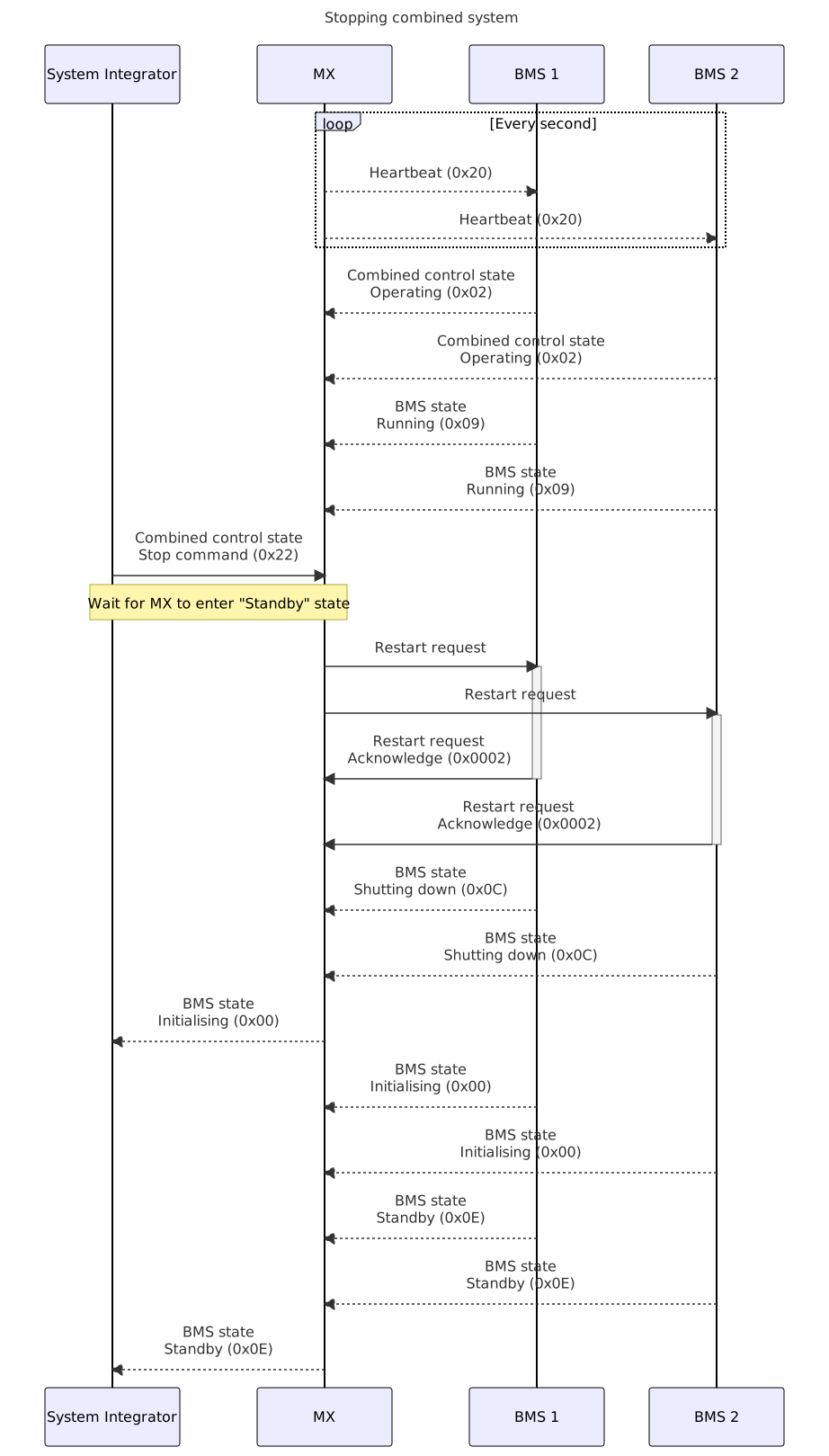
Once system is in standby state it can be started again using the Start command.
It is not possible to completely shut down a combined system using NMEA 2000 control.
Restarting a combined system after the number of Running BMSs drops below the "Required number of BMSs" as configured in the SmartLink MX / PLC settings:
- Detect
BMS state:Errorstate of SmartLink MX type device - Fix source of issue before continuing
- Send
Combined control state:Reset - Wait for
BMS state:Standbystate - Start system if required using start procedure
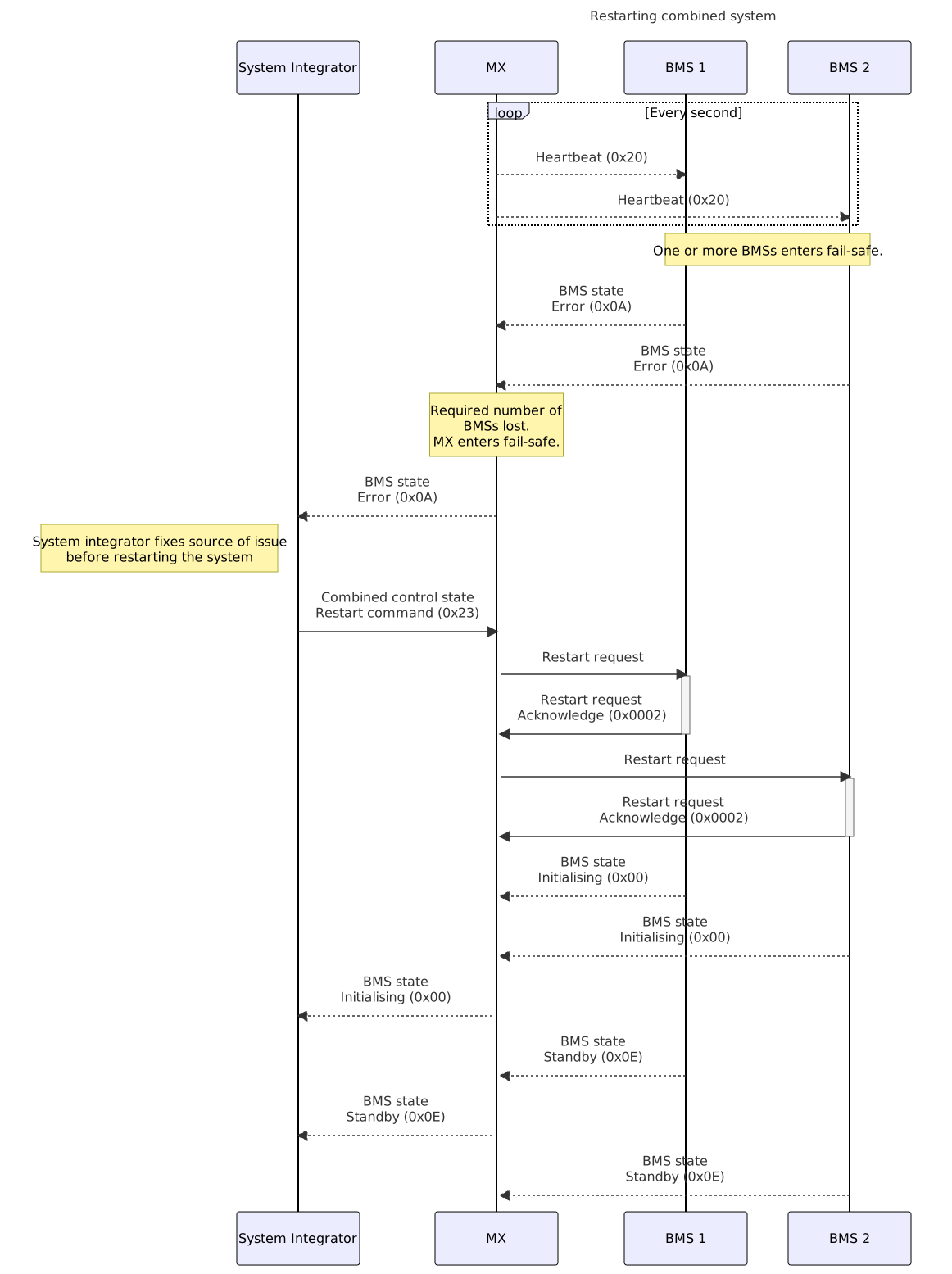
¶ Individual BMS flows
For Master HV systems Combined control state: Heartbeat needs to be transmitted continually with a 1 second interval.
Starting a system can be done via NMEA 2000, however in systems using Master LV, 12V or SmartLink Connect the BMSs need to be turned on manually using a physical button / input. These devices will then enter a state where they can be started using the NMEA 2000 (BMS state: Standby). Devices shut down or restarted using NMEA 2000 will return to this state automatically.
Start procedure:
- Send
Combined control state:Start commandcommand - Wait for
BMS state:RunningorErrorstate
The respective Communication guide describes the available error registers.
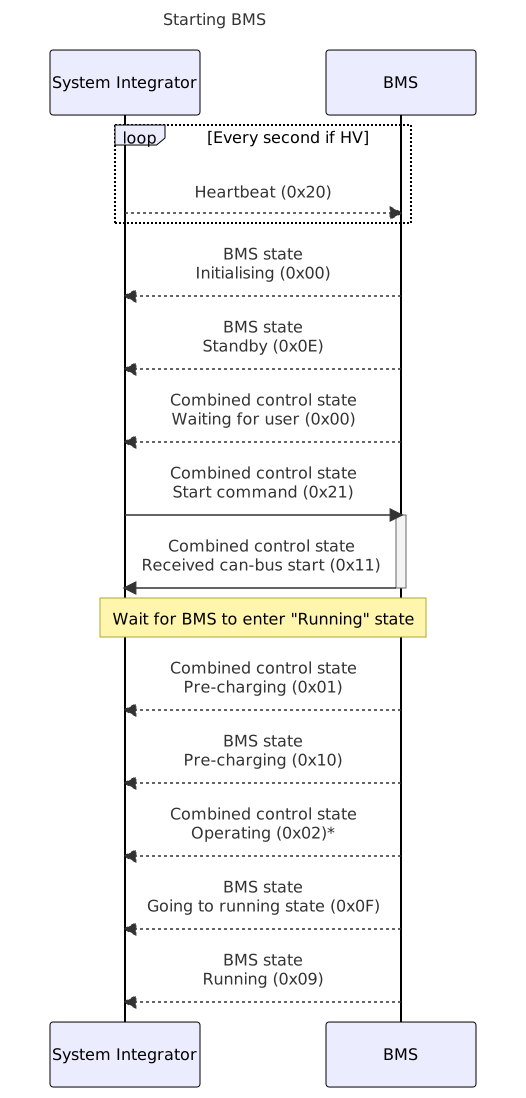
Note that a Master HV does not send the
Combined control stateOperatingresponse if theCombined BMSssetting is not enabled.
While the system is running the BMS state will remain Running. On change or on request this variable can be retrieved.
Additional variables as described in the Communication guides are available to more precisely monitor the live status of the BMS, but this is not required.
Connected charges can be controlled as described in Controlling chargers using NMEA 2000
To ensure a graceful shut down of the system the chargers and loads should be shutdown or limited before stopping the BMS.
Shutdown procedure:
- Send
Combined control state:Stopcommand - Wait for
BMS state:Standbystate
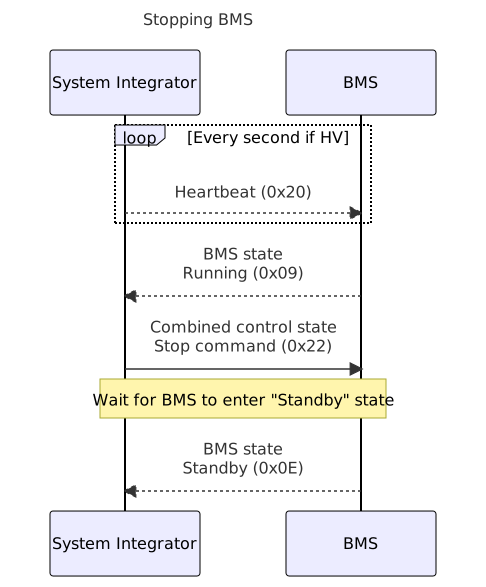
Once system is in standby state it can be started again.
Starting the device after a
Stopcommand when controlling a Master LV or Master LV 12V requires the sending of an additionalStartcommand, spaced at least 5 seconds, before the normal start up procedure.
It is not possible to completely shut down a BMS using NMEA 2000 control.
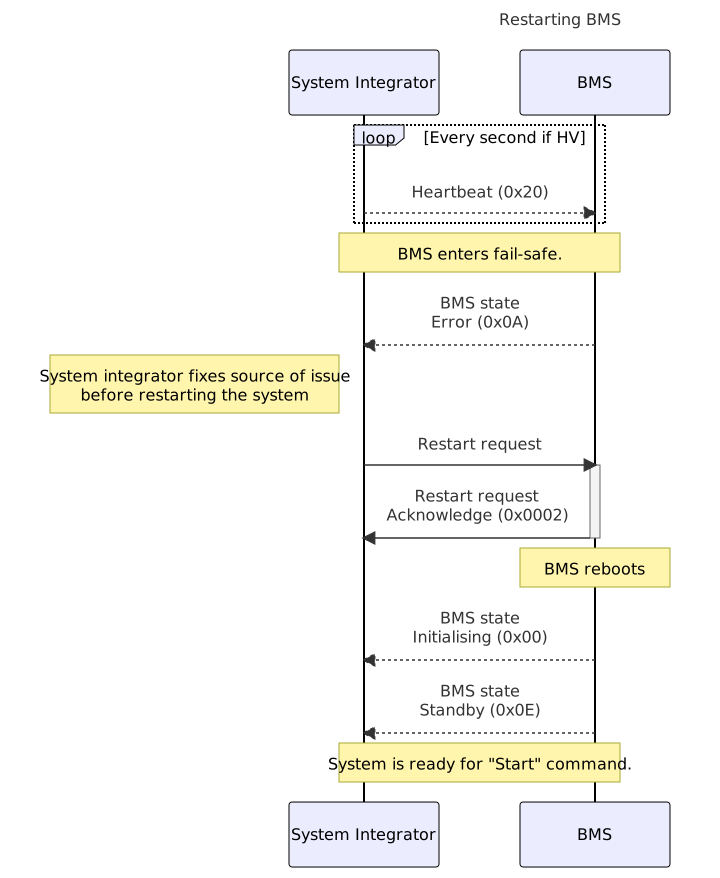
Restart procedure:
- Detect
BMS state:Errorstate - Fix source of issue before continuing
- Send
Restart request - Check for
Acknowledgeresponse - Wait for
BMS state:Standbystate - Start system if required using start procedure
¶ Controlling chargers using NMEA 2000
This section describes the values used to control chargers and loads using active limits set by the battery system.
A BMS defines an active voltage and current limit for both charging and discharging.
These values are available as VREGS, these are identifiers assigned to parameters and commands.
A full list of the available data for each device can be found in the respective Communication Guide:
A chargers limits should be controlled based on the active limits as defined by the battery system.
Systems based on a SmartLink MX, SmartLink PLC or similar MG devices have their variables intelligently combined to give one combined value for each one of the limit parameters.
The chargers should therefore only be controlled based on the values from the combining device.
¶ Limit registers
| Name | VREG | Type | Invalid value | Resolution | Unit | Transmission interval |
|---|---|---|---|---|---|---|
| Charge voltage limit | 0x0390 | uint32 | 0xFFFF FFFF | 0.01 | V | 5 seconds |
| Charge current limit | 0x0391 | uint32 | 0xFFFF FFFF | 0.1 | A | 5 seconds |
| Discharge voltage limit | 0x0392 | uint32 | 0xFFFF FFFF | 0.01 | V | 5 seconds |
| Discharge current limit | 0x0393 | uint32 | 0xFFFF FFFF | 0.1 | A | 5 seconds |
¶ Battery pack charge voltage limit
The master BMS will do an initial check on startup to define the battery pack charge voltage limit.
In case the battery is fully charged, the limit will be set to the actual battery pack voltage.
Otherwise the limit will be set to maximum charge voltage defined by the charged boundary limit.
Due to measurement tolerances of the BMS and EMS an offset is added or subtracted to this limit.
If the fully charged boundary limit is reached, the limit will be set to the actual battery pack voltage added with an offset.
If the battery pack continued to be charged during this condition, the limit will be decreased each 10 seconds until below 96 % of the battery pack charged voltage.
The limit will be increased when the battery pack is within the boundary limits working area.
¶ Battery pack charge current limit
The master BMS will do an initial check on startup to define the battery pack charge current limit.
This limit will be set to the battery pack maximum charge current or maximum current of the battery management controller, whichever is lower.
During the initial check the highest battery cell temperature, lowest battery cell temperature or highest battery module power terminal temperature is outside the boundary limits,
the battery pack charge current limit will be set to a minimum.
In one of the following conditions the charge current limit will be decreased every 5 seconds until 0 A:
- The highest battery cell voltage is above the charged boundary limit including offset;
- Before reaching the over or under battery cell temperature critical boundary limit, the charge current limit will be decreased until 0 A;
- Before reaching the battery module power connection terminal over temperature critical boundary limit, the charge current limit will be decreased until 0 A;
The limit will be increased when the battery pack is within the boundary limits working area.
¶ Battery pack discharge voltage limit
The master BMS will do an initial check on startup to define the battery pack discharge voltage limit.
In case the battery is fully discharged, the limit will be set to the actual battery pack voltage.
Otherwise the limit will be set to minimum discharge voltage defined by the discharge boundary limit.
Due to measurement tolerances of the BMS and EMS an offset is added or subtracted to this limit.
If the fully discharged boundary limit is reached, the limit will be set to the actual battery pack voltage subtracted with an offset.
If the battery pack continued to be discharged during this condition, the limit will be increased each 10 seconds until above 105 % of the battery pack discharged voltage.
The limit will be decreased when the battery pack is within the boundary limits working area.
¶ Battery pack discharge current limit
The master BMS will do an initial check on startup to define the battery pack discharge current limit.
This limit will be set to the battery pack maximum discharge current or maximum current of the battery management controller, whichever is lower.
In case at this initial check the highest battery cell temperature, lowest battery cell temperature or highest battery module power terminal temperature is outside the boundary limits,
the battery pack discharge current limit will be set to a minimum.
In one of the following conditions the discharge current limit will be decreased every 5 seconds until 0 A:
- The lowest battery cell voltage is below the discharged boundary limit subtracted with an offset;
- Before reaching the over or under battery cell temperature critical boundary limit, the discharge current limit will be decreased until 0 A;
- Before reaching the battery module power connection terminal over temperature critical boundary limit, the discharge current limit will be decreased until 0 A;
The limit will be increased when the battery pack is within the boundary limits working area.
¶ Example message
Device MG(NAD: 0x50) = MG SmartLink MX or SmartLink PLC or MG BMS or other MG device
Global(NAD: 0xFF)
- Register:
Charge voltage limit0x0390 - Variable: 0x00000B28 = 2856 = 28.56 V
| CAN-ID | Data |
|---|---|
| 0x1CEFFF50 | 0x66 0x99 0x90 0x03 28 0B 00 00 |